



PHP2Shell and WordPress: is your site affected?
WordPress runs on a language called PHP, and on October 21 PHP announced a critical hole in it, nicknamed PHP2Shell. An attacker can take over a site with one request, without a password, no matter which plugins or security tools you have. If your site runs an old PHP version, it is exposed right now. Here is how to check in two minutes, and what to do next.
Find your PHP version
You do not need to touch any code. WordPress shows the version in a built-in screen.
Open Site Health
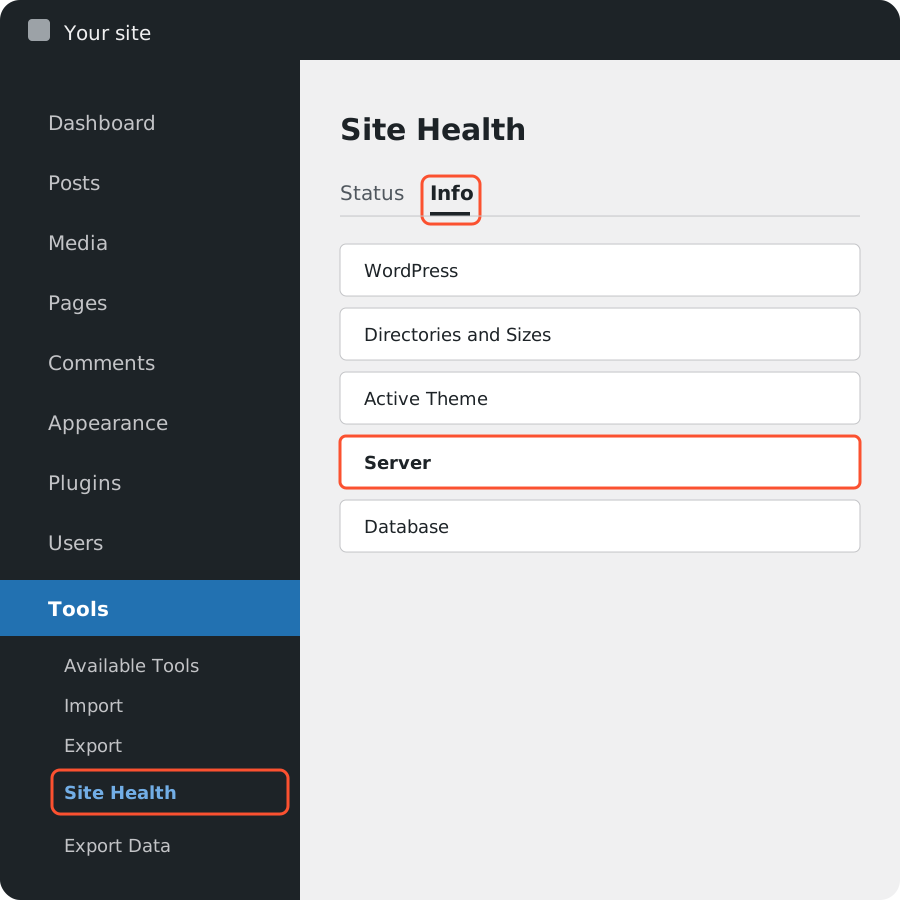
Log in to your WordPress dashboard. In the left menu go to Tools, then Site Health.
Open the Info tab
At the top of Site Health switch from Status to Info, then open the Server section.
Read the PHP version
The line PHP version shows something like 8.3.36. Compare it with the table below.
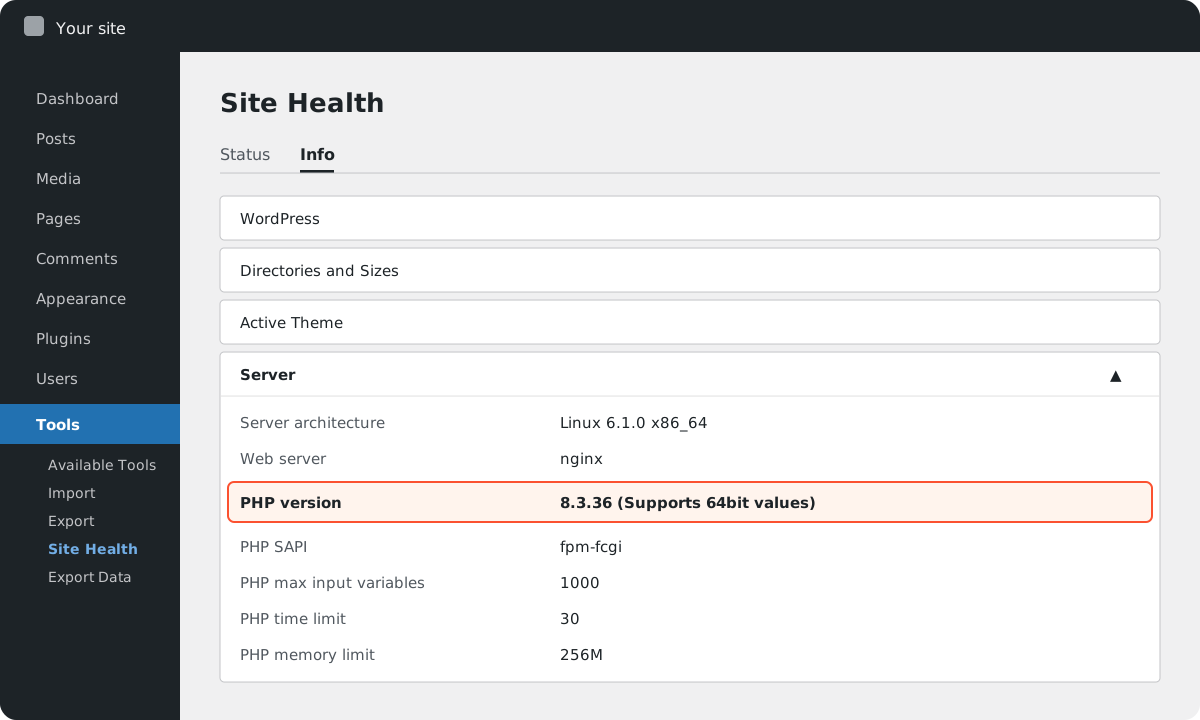
| Your PHP version | What it means |
|---|---|
| 8.5.12, 8.4.27, 8.3.36, 8.2.35 or newer | Patched. You are fine for PHP2Shell. Keep automatic updates on. |
| 8.2 to 8.5, but a lower number than those | Exposed. Ask your host to update today, or switch the version in your hosting panel. Usually a five-minute job. |
| 8.1, 8.0 or 7.4 | Exposed, and PHP no longer releases fixes for these. Some hosts apply a backport; most sites need to move to 8.3 or 8.4. That move needs testing, which is what we do. |
| 7.3 or older, including 5.x | No fix exists. The site must move to a supported PHP. Themes and plugins this old usually need work too. |
Cannot log in, or the dashboard is managed by someone else? Send us the site address and we tell you what we can see from outside and what to ask your host.
It depends on where your site lives
Four typical situations. Yours is one of them.

Managed WordPress hosting
WP Engine, Kinsta, SiteGround, Flywheel, Pressable and the like. They patch PHP for you, often within a day. Still check Site Health: a site pinned to an old version by a developer years ago may have been skipped.

Shared hosting with cPanel or Plesk
Hostinger, Bluehost, GoDaddy, Namecheap, OVH and most local providers. The panel has a PHP version selector; the host updates each version, but you choose which one your site uses. If it says 7.4 or 8.0, picking 8.3 is the fix, after a backup.

Your own server or VPS
DigitalOcean, Hetzner, AWS, a dedicated box. Nobody updates PHP unless someone logs in and does it. This is where most exposed WordPress sites are, and where we usually find the oldest PHP.

Built by a freelancer or agency
If the people who built the site are gone, you may not even know where it is hosted. We find out, fix it, and hand you the keys with a one-page summary of what you own.
Signs a WordPress site has been compromised
Pages you did not publish
Pharmacy, casino or crypto pages, or Google showing your site with titles in another language.
New admin users or plugins
Users you do not recognise, plugins you never installed, or files with odd names in the uploads folder.
Redirects and warnings
Visitors sent to other sites, browser or Google Search Console warnings, hosting emails about unusual activity or outgoing spam.
Nothing visible at all
A successful PHP2Shell attack can leave the site looking perfectly normal. That is why the version check matters even when everything seems fine.
If you see any of this: do not delete things, do not restore over the evidence. Take a backup and get in touch. We clean the site, close the hole and tell you what was taken.
You send the address. We take it from there.
No jargon, no upsell. A fixed price before we touch anything, and a report you can forward to your boss or your host.
Free check
You send the site address. We reply the same business day with what we see and whether anything needs doing.
Backup and test
A full backup, then the PHP update tried on a copy of your site first, so a plugin that breaks is caught before anyone notices.
Update and clean
PHP moved to a patched release, the site checked for signs of a break-in, passwords and keys rotated if needed.
Keep it that way
Automatic updates and a firewall set up properly, and a one-page summary of what your site runs on and who to call next time.
Questions WordPress owners ask us
Is my WordPress site affected by PHP2Shell?
If your site runs on a PHP version older than 8.5.12, 8.4.27, 8.3.36 or 8.2.35, yes. That includes every site still on PHP 8.1, 8.0, 7.4 or older. The WordPress version, your theme and your plugins make no difference, because the flaw is in PHP itself, the language WordPress runs on.
Will a security plugin like Wordfence protect me?
Not against this. The attack is handled by PHP before WordPress and its plugins start, so a plugin never sees it. A firewall at the hosting or CDN level that limits request size can slow attackers down, but only updating PHP closes the hole.
Will updating PHP break my site?
Moving from one patched 8.x release to the next, for example 8.3.30 to 8.3.36, breaks nothing. Jumping from PHP 7.4 or 8.0 to 8.3 can break old themes and plugins, which is why we test on a copy first and keep a backup. Staying on an old PHP is the bigger risk.
My hosting company says they updated. How do I check?
Tools → Site Health → Info → Server shows the PHP version. 8.5.12, 8.4.27, 8.3.36 or 8.2.35 and newer are safe. Some hosts patch without changing the version number; if in doubt, ask them for a written confirmation or send us the address and we check.
What does the check cost?
Telling you whether your site needs work is free. If it does, you get a fixed price before we touch anything, and we reply the same business day.
Not sure? That is exactly when to ask
Send the site address and, if you know it, where it is hosted. We reply the same business day. The check is free.
Send us your site address