What's inside
A scanner that explains itself
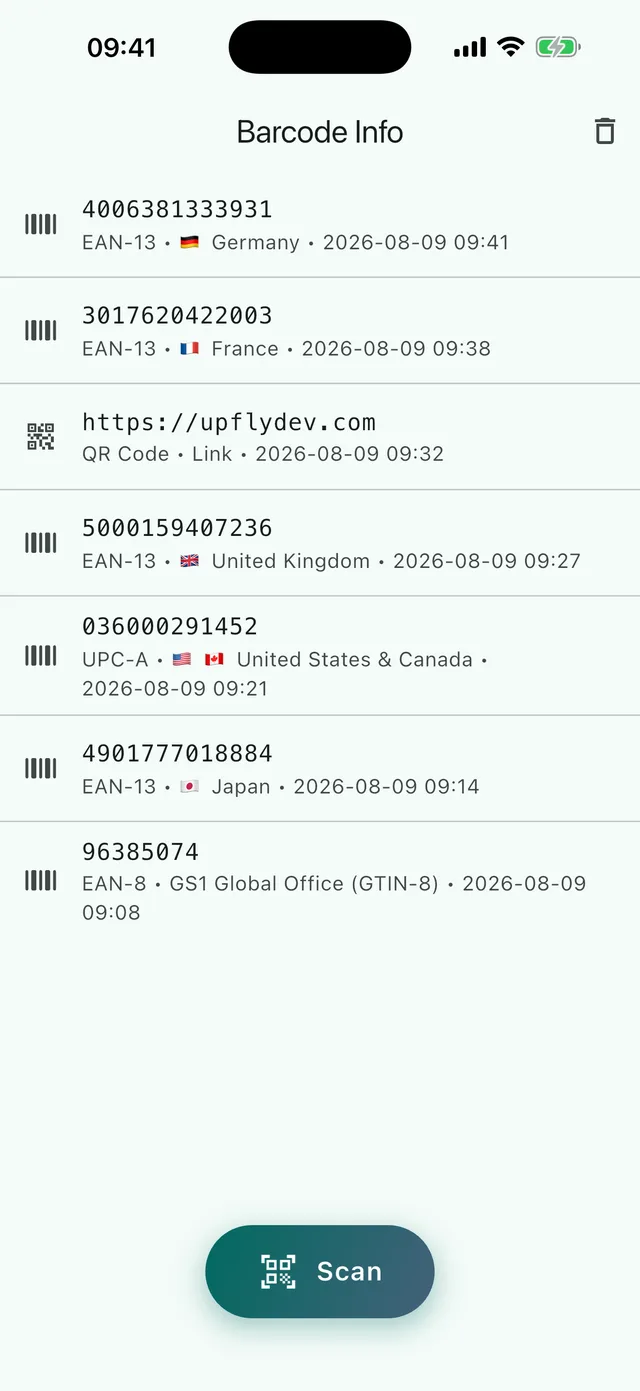
Most scanners hand you the digits and stop. This one tells you what kind of code it was, whether the number is even well-formed, and what — honestly — it does and doesn't reveal.
🔢
Which code it is
Thirteen symbologies, named properly: EAN-13, EAN-8, UPC-A, UPC-E, ITF, Code 128, Code 39, Code 93, Codabar, QR, DataMatrix, Aztec and PDF417.
✅
Whether the number checks out
Product numbers carry a check digit. The app recomputes it for GTIN-8, GTIN-12, GTIN-13 and GTIN-14 — expanding UPC-E to UPC-A first — and says plainly whether it is valid.
🌎
Where it was registered
The GS1 prefix names the organization that issued the company prefix. So the app says “registered in”, never “made in”, and explains the difference right under the flag.
🔗
What a QR code holds
Free-form codes are classified before you act on them: a link, a Wi-Fi network, a contact, an email, a phone number, an SMS, a location, a calendar event or plain text.
📦
What a shipping label says
A GS1-128 or GS1 DataMatrix code is not one number, it is a list of fields. The app reads them out: batch or lot, best before and expiry dates, serial number, pallet number, weight and size. An identifier it does not know yet stops the reading and says so, instead of guessing.
⚙️
Storage you can see
Settings say how many scan photos are on the phone and how much room they take. Look through them, delete a single one, or clear them all and keep the scans. Nothing is measured from a guess: the numbers come from the files themselves.
📸
A photo of every scan
Each scan keeps the camera frame it was read from, uncropped, so a row of digits in the history stays recognisable as the thing you were holding. Photos live on the device and are deleted with the scan — or on their own.
📝
Notes and filters
Add a note to any scan, and your earlier notes come back as one-tap chips. Filter the history by kind of code, by date, or down to the scans with a note, a photo or a failed check digit. On an iPad or a tablet held sideways, the list and the scan sit side by side.
📶
Offline by construction
No backend and no accounts. Recognition runs from a model bundled inside the app, which is why it works in a shop basement with no signal. The app goes online only to buy or restore Premium, through Apple or Google.