CycleWingman Get the app

Your relationship weather app

Better timing. Fewer own goals.

CycleWingman turns your partner’s cycle into a simple daily forecast: Green, Yellow, Orange or Red, with one clear thing to do and one to avoid. Set up with her knowledge. Kept on your phone.

  • “Data Not Collected” on the App Store
  • No account
  • Works offline

Free on iPhone, iPad, Apple Watch and Android. Wingman+ is optional, $1.99 a month.

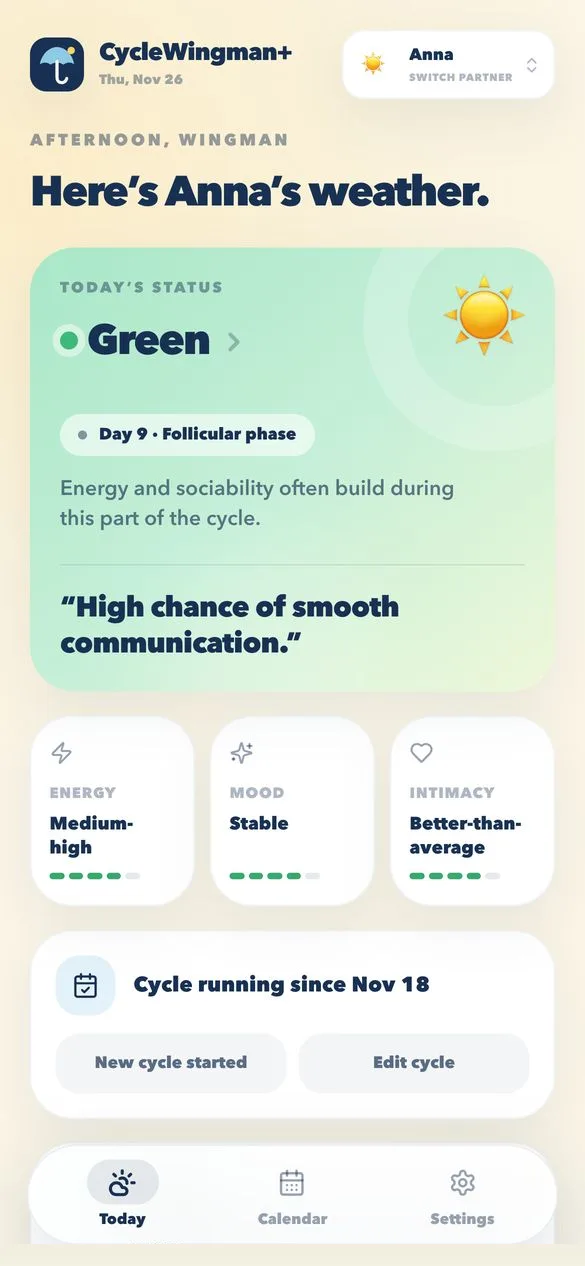
CycleWingman Today screen: a green day, day 9 of the cycle, with energy, mood and intimacy meters and the line High chance of smooth communication
CycleWingman on Apple Watch showing a 5-day outlook

Four colours. You already know how to read them.

  • Green Great day. Plans, dates, big asks.
  • Yellow Normal day. Just don’t stir drama.
  • Orange Tread gently. Patience runs low.
  • Red Care mode. Comfort over plans.

Forecasts are based on typical patterns, not certainty. Always listen to your partner. She’s the source of truth.

How it works

Under a minute to set up. A glance a day after that.

You don’t need to understand every detail of your girlfriend’s or wife’s cycle. You need to know what kind of day it is, and what would actually help.

  1. Add her details, with her

    A name or a nickname, when her last cycle started and roughly how long it runs, or whether she takes the pill. The app asks you to confirm she knows about it and is comfortable with it. That step is not optional.

  2. Check the day’s weather

    One colour, three meters for energy, mood and intimacy, one honest line, and a concrete “do this, avoid this”. The next five days sit right underneath.

  3. Keep it honest

    Mark a new cycle the day it starts and note how days really went. The forecast corrects itself from the dates you confirm, not from guesswork.

What it does

A forecast, and something to do about it.

Most apps about cycles hand you data. This one hands you a next step, for today and for the days you are planning around.

Today

One glance, one clear move

The day’s colour, the phase, how energy, mood and intimacy are likely to run, and one line that says it straight. Then the part that matters: what to do, and what to leave alone.

  • “Do this” and “avoid this”, every day
  • A 5-day outlook, free
  • The month in colour on the calendar
Today screen scrolled to the advice: Do this, suggest a date, flirt, or make an actual plan. Avoid this, overthinking a perfectly good day. Below, a birthday in 12 days and a 5-day outlook of green days

Calendar and Plan something

Pick the day before you pick the restaurant

Tell it what you are planning, a date night, a serious talk, a big ask or time with friends and family, and it ranks the days ahead for exactly that. Already have a date fixed? Check it and know what you are walking into.

  • Answers in words, never a score: “Good day for this”, “Workable, not ideal”
  • Save a plan and it lands on the calendar
  • Free ranks the next 7 days. Wingman+ ranks 45
Calendar for November with every day coloured green, yellow, orange or red, and buttons for Plan something, Journal and Dates
Plan something screen: a date night selected, with the best days in the next 45 days listed

New in 1.5 Important dates

The days that can’t move

Her birthday, your anniversary, the weekend away. Add them once and see how each one is shaping up: a countdown, the day’s colour, and a verdict in plain words. Too far out to call? It says exactly that.

  • The nearest date shows up on Today, and all of them on the calendar
  • Free: the dates, the countdown, and the forecast inside the free week
  • Wingman+: the forecast further out, the best evening near a birthday or an anniversary, and a heads-up a week ahead and the evening before
Important dates screen: a birthday in 12 days on a yellow day, a weekend in Lisbon in 5 weeks on a green day, and an anniversary in 3 months that is too far out to call
A birthday that falls on a red day: A rough one. Go gentle. Best evening near it: Sunday, December 20

New in 1.5 Keeping it current

A forecast that doesn’t run on old facts

Cycles don’t read calendars. Mark a new one the day it starts, from Today or from any past day in the calendar, and everything after it re-times itself. If the date looks suspiciously early, the app asks whether it is a new cycle or a correction.

And a few times a year it quietly asks: is this still right? One tap, and the forecast keeps working from the truth. In the app only, never a notification.

A card on Today reading Cycle running since November 2, with the buttons New cycle started and Edit cycle A quick check card asking Is this still right for Anna? Natural cycle, about 28 days, with the buttons Still right, Change and Later

Journal and patterns

It learns your relationship. From your notes, on your phone.

Note how the day actually went: a mood, a tag, a line if you like. The journal keeps all of it, and that part is free, because it is your own writing. It also tells you how often your notes matched the forecast.

Wingman+ reads the notes back to you: which phase holds the hard days, where the best ones land, how long making up takes. Then it nudges the mood forecast toward what you recorded. Plain arithmetic on your own notes, and it tells you when a day has been tuned.

Journal screen: 14 days logged, notes matched the forecast 7 of 14 days, the forecast tuned from notes, and a list of day notes

Heads-ups and Wingman alerts

A warning before it matters

Switch on daily heads-ups and you get the morning forecast and a nudge the evening before a red day. Free, opt-in, scheduled on your phone, and never with her name in them.

Wingman alerts add lead time: one to three days before a rough stretch begins, and before a good run too, so it is not only bad news. Plus a reminder the evening before a day you planned, a nudge when the forecast needs a check-in, every partner, and the hours you choose.

  • Free Today looks red 🌧️ Care mode: tea, snacks, low-effort plans, extra kindness.
  • Wingman+ Rough patch in 2 days 🌥️ Anything that needs her patience, do it before then.
  • Wingman+ Good run starts tomorrow ☀️ A few clear days coming. Worth putting something in the calendar.
  • Wingman+ Tomorrow: a date night The day looks green ☀️. Nothing to change — just don’t forget.

New in 1.5 iPhone Duo, iPad and tablets

Room to spread out, and it knows where the fold is

On iPad and Android tablets the app goes two-column: the day beside what to do with it, the month beside the day you tapped. On iPhone Duo the tabs move into the side rail on the outer display, and when it is half folded the columns step apart so nothing sits on the crease.

CycleWingman on the inner display of iPhone Duo: the green forecast card on the left, the advice and the 5-day outlook on the right, and the tabs in a rail at the side

And the rest of the kit

  • Apple Watch

    The day’s status and the 5-day outlook on your wrist, with watch-face complications that never show a name. You can write today’s note from the watch.

  • Widgets

    The day’s colour on your iPhone home screen and lock screen, and on Android in any size down to one cell. On iPhone, show one partner, all of them, or no names at all.

  • App lock

    Face ID or your passcode on iPhone, fingerprint or screen lock on Android. Turning it off needs the same check, so a borrowed phone stays shut.

  • Natural cycle or pill

    Tell it which one applies and the forecast follows that rhythm instead of guessing. It is a mood estimate either way, never contraception advice.

  • Three languages

    English, Russian and Polish, written for each language and not run through a translator. The watch and widgets follow the phone.

  • More than one partner Wingman+

    Up to three profiles, each with its own forecast, notes, colour theme and, if you like, your own emoji.

  • Backup and restore Wingman+

    Export everything to a file and load it on a new phone. The file goes where you send it. Nothing is uploaded.

  • No ads. Ever.

    Ads need to know who you are. This app doesn’t, and it is staying that way.

Private by design

We couldn’t read your data even if we wanted to. There are no servers.

This is personal: it is about her, and about the two of you. It has no business being in anyone’s cloud, so it isn’t.

  • No account. No sign-in, no email, no phone number.
  • No cloud. Everything stays on your device. Watch data goes from your iPhone straight to your watch.
  • No analytics, no ads, no trackers in the app. The App Store privacy label reads “Data Not Collected”.
  • Discreet on purpose. Notifications never carry her name. Watch complications never show one.
  • Yours to delete. Remove the app, or reset it in Settings, and everything is gone.

Free and Wingman+

Free does the job. Wingman+ looks further ahead.

One optional subscription, $1.99 a month. Still cheaper than one bad takeaway.

What is free and what Wingman+ adds
Feature Free Wingman+
Partners One Up to three, each with an independent forecast
Today The whole screen: colour, meters, do and avoid, 5-day outlook The same
Calendar Today and the next 7 days Every day of every month
Plan something Ranks the next 7 days and says when a better day lies beyond. Saved plans included Ranks the next 45 days
Important dates The dates, their names, the countdown, and the forecast inside the free week The forecast further out, and the best evening within three days of a birthday or an anniversary
Notes and journal All of it, plus how often your notes matched the forecast The same
Patterns from your notes The first pattern, in full Every pattern, and a mood forecast tuned to your notes
Notifications Morning forecast and an evening warning before a red day, for the active partner, at 9:00 and 20:00 Alerts 1 to 3 days before a rough patch or a good run, plan reminders, important dates a week ahead and the evening before, a nudge when a cycle is overdue, every partner, your hours
Keeping the cycle current New cycle, edit cycle, and the “still right?” check The same
Apple Watch, widgets, app lock Included Included
Partner icon and colour Six presets Any emoji, any hue
Backup and restore Not included Export to a file, restore on a new phone

Wingman+ is a monthly auto-renewable subscription bought inside the app: $1.99 a month in the US, shown in your local currency before you confirm. Payment is charged to your Apple Account or Google Play account. It renews automatically unless you cancel at least 24 hours before the end of the current period, and you can manage or cancel it at any time in your App Store or Google Play subscription settings. A subscription bought on one platform does not carry over to the other, because there are no accounts to link them. If it lapses, nothing is deleted. See the Terms of Use and the Privacy Policy.

Fair questions

Before you install it

Does she need the app too?

No. CycleWingman lives on one phone, yours. There is no second app and no shared account. What she does need is to know about it: before you can add a partner, the app asks you to confirm she is aware of it and comfortable with it. The details go in best when you fill them in together.

Can I use it without telling her?

No, and it is not meant for that. Adding a partner starts with confirming she knows about it and is comfortable with it. The point is for you to show up with the right energy on the right day, not to keep anything from her.

How accurate is the forecast?

It is a forecast, like the weather: an estimate from typical patterns, not a certainty. It gets closer the longer you use it, because every cycle start you confirm corrects the cycle length it works from. It will still be wrong some days. She is the source of truth, and the app says so.

Is it a medical app?

No. CycleWingman is not a medical device and gives no medical advice. It is not for contraception or fertility planning, and it does not assess anyone’s health. It is a lifestyle estimate that helps you be a more attentive partner. For anything medical, she talks to a doctor, not to your phone.

Is it a period tracker?

Not in the usual sense. Period trackers are made for the person who has the cycle and record health details. CycleWingman is made for couples, seen from his side: it asks only when her cycle started and roughly how long it runs, and turns that into something you can act on, what kind of day it is and what to do about it.

What does it cost?

The app is free, with no ads. The free version gives you one partner, the full Today screen with the 5-day outlook, the calendar for the next seven days, notes and the journal, important dates, daily heads-ups, widgets, the Apple Watch app and app lock. Wingman+ is one optional subscription, $1.99 a month in the US and priced in your own currency in the store.

Where is my data?

On your device, and nowhere else. There is no account, no server, no analytics and no ad SDK, so there is nothing for us to read, sell, leak or hand over. Apple Watch data travels from your iPhone straight to your watch. Delete the app and everything is gone.

What happens if I get a new phone?

Because nothing is stored on a server, nothing follows you automatically. With Wingman+ you can export everything to a file and restore it on the new phone. The file goes wherever you send it and is never uploaded by the app.

What happens if I cancel Wingman+?

Nothing is deleted. The app goes back to the free version: one partner stays open, the calendar shows the next seven days, and alerts return to the two daily heads-ups. Your notes, plans and dates stay where they are. Subscribe again and everything is back as it was.

Which devices and languages does it support?

iPhone and iPad on iOS 15 or later, Apple Watch on watchOS 10 or later, and Android phones and tablets on Android 7 or later. iPhone widgets need iOS 17. The app speaks English, Russian and Polish, follows your device language, and lets you pin one in Settings.


Be a better partner, not a meteorologist.

Check tomorrow’s weather tonight. Free, private, and set up in under a minute.